Authentication
Previous page API Consumers
Next pageApp Credentials
Swift uses OAuth 2.0, an industry-standard protocol for authorisation. It operates through the exchange of tokens, which grant specific permissions to the client application. We will walk you through the steps to request, use and dispose the tokens.
If you are using Swift SDK or Swift Microgateway, then you can skip the following as the tools are embedded with authentication and authorisation capabilities.
| MV-SIPN | Internet | |
|---|---|---|
| Sandbox | sandbox.swift.com/oauth2/v1 | sandbox.swift.com/oauth2/v1 |
| Pilot | api-test.swiftnet.sipn.swift.com/oauth2/v1 | api-pilot.swift.com/oauth2/v1 |
| Live |
| api.swiftnet.sipn.swift.com/oauth2/v1 |
| api.swift.com/oauth2/v1 |
POST an API request to Authorisation API Base URLFor example: sandbox.swift.com/oauth2 /v1/token to request an access token. Access tokens automatically expire after 30 minutes.
Your application credentials, consumer-key and consumer-secret of the app you created, are exchanged through the Basic Authentication Scheme in the authorization header. If you do not have an app yet, then create an app to get started.
Calculate the base-64 encoded value of consumer-key:consumer-secret and use it in the authorization header with the keyword Basic in front of it.
Example: If an app's consumer-key is demo and consumer-secret is p@55w0rd, then the authorization header should be Authorization: Basic ZGVtbzpwQDU1dzByZA==This is the base64 encoded value of demo:p@55w0rd
Determine the authorisation grant type used by the specific API under API Guides. You will find this information in the Authentication page of each API product. Depending on the data sensitivity behind the APIs you are trying to access, you will be applying one of the two authorisation grant types: Password Grant Type or JWT Bearer Grant Type.
For APIs using password grant type, you need a pair of Swift-issued License ID & License Secret, which can be created from Swift.com.
| Parameters | Value | Descriptions |
|---|---|---|
| grant_type | password | This value is specifically defined for password authorisation grants in RFC 6749. Use the value as is. |
| username | License ID from Swift.com | Refer to License ID & Secret to create the License ID for the API product after subscribing to the service. |
| password | License Secret from Swift.com | Refer to License ID & Secret to create the License Secret for the API product after subscribing to the service. |
License ID and License Secret are not the same as Consumer Key and Consumer Secret.
For APIs using JWT Bearer grant type, you must generate a JSON Web Token (JWT) using your Swift-issued PKI certificates.
| Parameters | Values | Descriptions |
|---|---|---|
| grant_type | urn:ietf:params:oauth:grant-type:jwt-bearer | This value is specifically defined for JWT authorisation grants in RFC 7523. Use the value as is. |
| scope | RBAC role/qualifiers | You can find the RBAC role and applicable qualifiers for each API under API Guides. |
| assertion | Signed JSON Web Token | This value is the signed JWT containing the claims and signed by your channel certificate. |
The JWT structure has three parts: header, payload and signature. For more information about the JWT structure, see RFC7519.
| Headers | Descriptions |
|---|---|
| typ | Type. This parameter defines the media type of the complete JWT. Use JWT. |
| alg | Algorithm. This parameter defines the signing algorithm used for the JWT. Eg, HS256 for business certificate and RS256 for channel certificate. |
| xmldsig | This parameter is the encoded xmldsig signature. Use this parameter ONLY if using business certificate. |
| x5c | This parameter is the public key used to verify the JWT. Use this parameter ONLY if using channel certificate. |
| Claims | Descriptions |
|---|---|
| iss | Issuer. Use the consumer-key value from the app you created. |
| aud | Audience. Use the Authorisation API Base URLs for Pilot or Live depending on the environments. |
| sub | Subject. This is the subject DN of the certificate used to sign the JWT. |
| jti | JWT ID. This is the unique identifier for the JWT used to detect duplicates. |
| exp | Expiration time. This is the expiration time (in seconds) on or after which the JWT MUST NOT be accepted for processing. |
| iat | Issued at. This is the time (in seconds) at which the JWT was issued. |
3Signature The signature is created by signing the header and payload with the private key of the Swift issued business certificate or channel certificate.
JWT Bearer Grant Type can be complex to implement. Consider using developer tools meant to help developers handle authentication and authorisation signing. These tools also support password grant type, making it easy for developers to access any APIs over Swift.
POST an API request to Authorisation API Base URLFor example: sandbox.swift.com/oauth2 /v1/token to request an access token. You will receive an API response like the one below.
200 OK
{
    "refresh_token_expires_in": "86399",
    "token_type": "Bearer",
    "access_token": "xisS2RfQ9A9GQ5BKv8dFuwelM15r",
    "refresh_token": "brFNHk7sKA5GVGmRH7gKWJc7RlR6t8Wc",
    "expires_in": "1799"
}The access_token returned above is used as the bearer token in each subsequent call to the Swift APIs. The bearer token is exchanged through the Bearer Authentication Scheme in the authorization header.
Example: Authorization: Bearer eqKaLgPGmrWyDTystA3HV233gyfkThis is the access token. .
Your application is responsible for securely managing the tokens generated for use both in storage and transit.
In the API response, you will also find refresh_token, which you can use to get a new access_token without authentication and authorisation again. POST an API request to Authorisation API Base URLFor example: sandbox.swift.com/oauth2 /v1/token with valid refresh token to re-generate access token for up to 24 hours.
| Parameters | Values | Descriptions |
|---|---|---|
| grant_type | refresh_token | Learn more about refresh_token in RFC 6749. Use the value as is. |
| refresh_token | refresh_token | refresh_token returned from the initial API call for obtaining the access token. |
| scope | RBAC role/qualifiers | Space-separated list of API RBAC role and qualifiers. |
You should only include Scope when refreshing an access token created from JWT Bearer authorisation grant type.
It is strongly recommended that your application disposes tokens that are no longer needed. This enables Swift to invalidate the tokens from further use. When invalidated, they can no longer be used to access Swift APIs. POST an API request to Authorisation API Base URLFor example: sandbox.swift.com/oauth2 /v1/revoke with valid access_token.
We will walk you through an example of authenticating Swift Messaging API (requires JWT-bearer grant) in the API Sandbox.
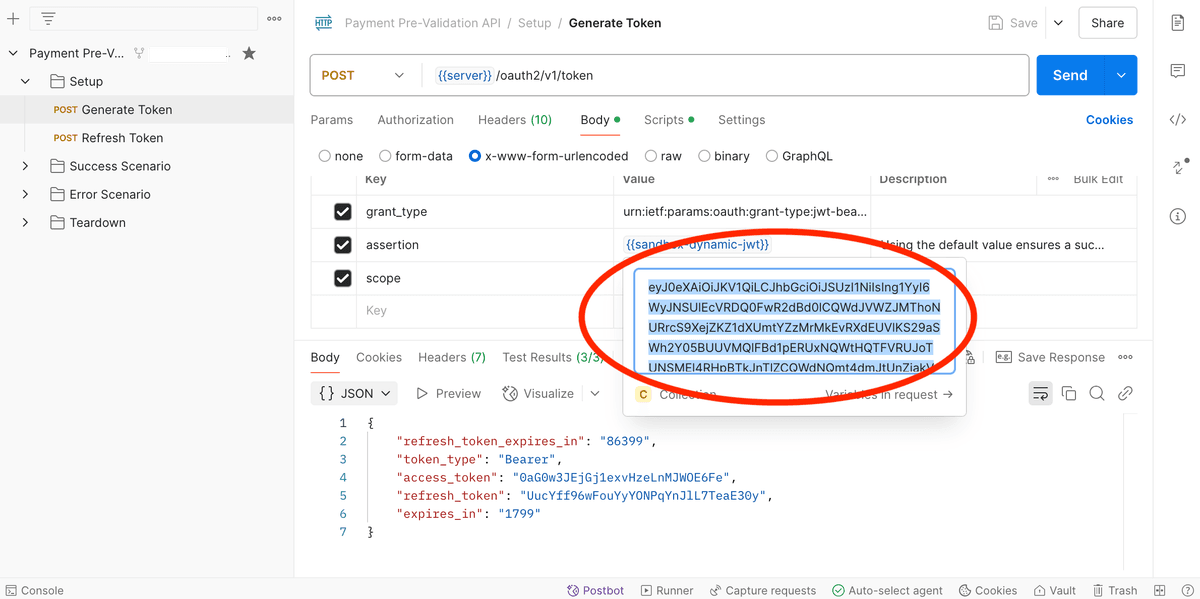
Congratulations, you have successfully obtained an access_token which you can use to call Payment Pre-validation API in the sandbox.
The assertion is the JSON Web Token (JWT) that is dynamically generated by the scripts in the collection, let's take a closer look at the generated JWT.
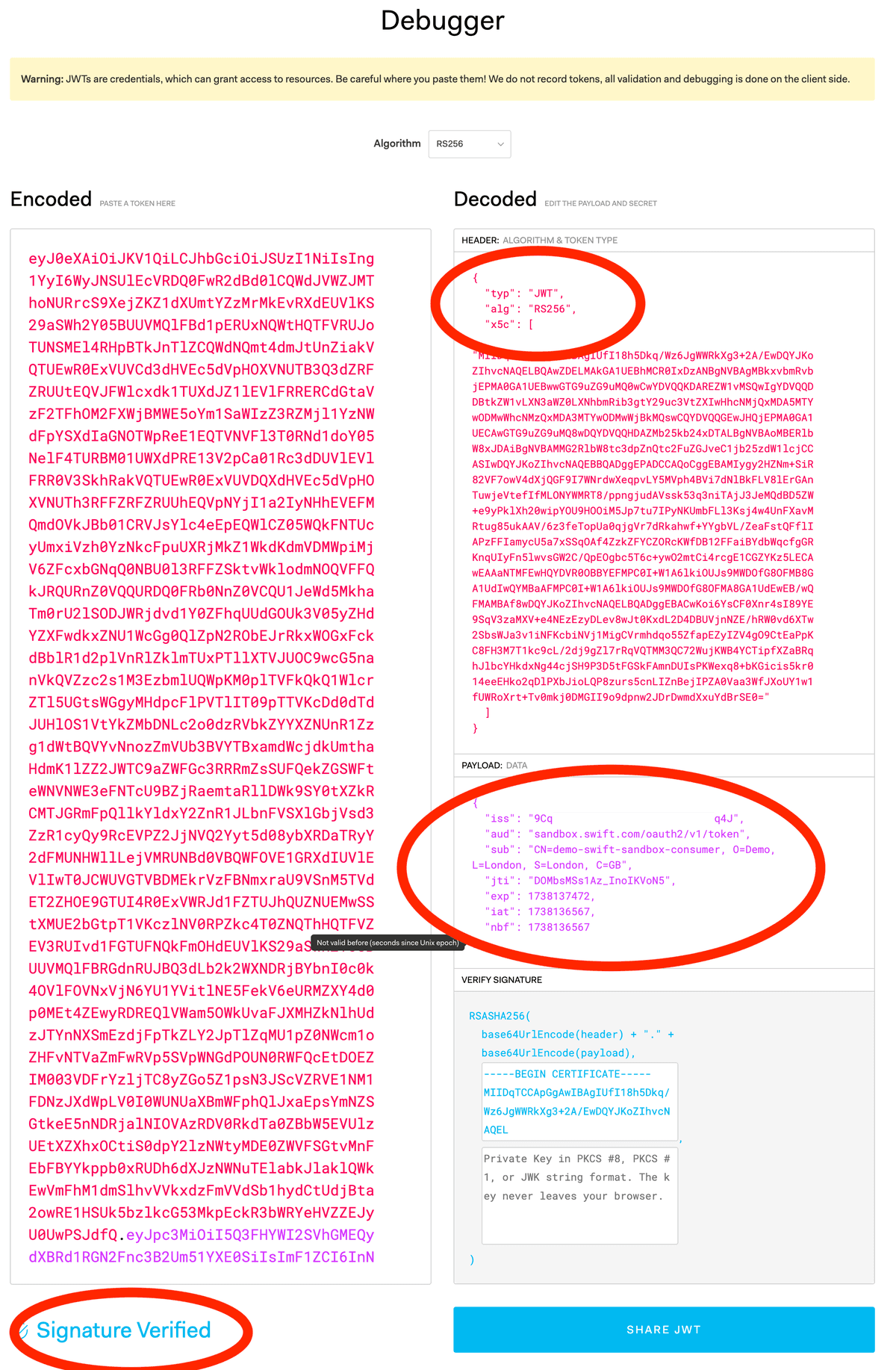
Of particular interest are the headers:
{
  "typ": "JWT",
  "alg": "RS256",
  "x5c": [
    "MIIDqTCC..."
  ]
}| Headers | Descriptions |
|---|---|
| typ | Type. MUST be 'JWT'. |
| alg | Algorithm. MUST be 'RS256'. |
| x5c | The first certificate in this array MUST be the certificate used to sign the token; noting that any additional certificates in the chain are ignored as full certificate chain validation is NOT currently implemented in Sandbox currently. The certificate used by default is a self-signed certificate, refer to access sandbox for what types of certificate you can use in the sandbox. |
And the claim:
{
  "iss": "LENzHZG9xENyAprIAYmLiJA5d0IxfWJH",
  "aud": "sandbox.swift.com/oauth2/v1/token",
  "sub": "CN=demo-swift-sandbox-consumer, O=Demo, L=London, S=London, C=GB",
  "jti": "suiP6v7eXeTkJDd17enBq",
  "exp": 1737728281,
  "iat": 1737727376,
  "nbf": 1737727376
}| Claims | Descriptions |
|---|---|
| iss | Issuer. MUST always be the consumer-key value |
| aud | Audience. MUST always be "sandbox.swift.com/oauth2/v1/token" |
| sub | Subject. MUST match the subject of the signing certificate (embedded with the token in the ‘x5c’ - header) |
| jti | JWT ID. MUST be a standard OAuth 'jti' (nonce) value |
| exp | Expiration time. MUST be a standard OAuth 'exp' (expires date) value |
| iat | Issued at. MUST be a standard OAuth 'iat' (issued at date) value |
| nbf | Not before. MUST be a standard OAuth 'nbf' (not before date) value |
It should be possible to verify the signature of any OAuth token intended for the Sandbox by using free OAuth token examination tools such as jwt.io.
We will walk you through an example of authenticating SwiftRef API (requires password grant) in the API Sandbox.
Congratulations, you have successfully obtained an access_token which you can use to call SwiftRef API in the sandbox. You can find the pre-filled credentials username and password in the Authorization call in the Body tab. These are dedicated sandbox credentials for you to use, refer to Access sandbox.